

Overview
Mori includes a terminal UI dashboard built with BubbleTea. Launch it with: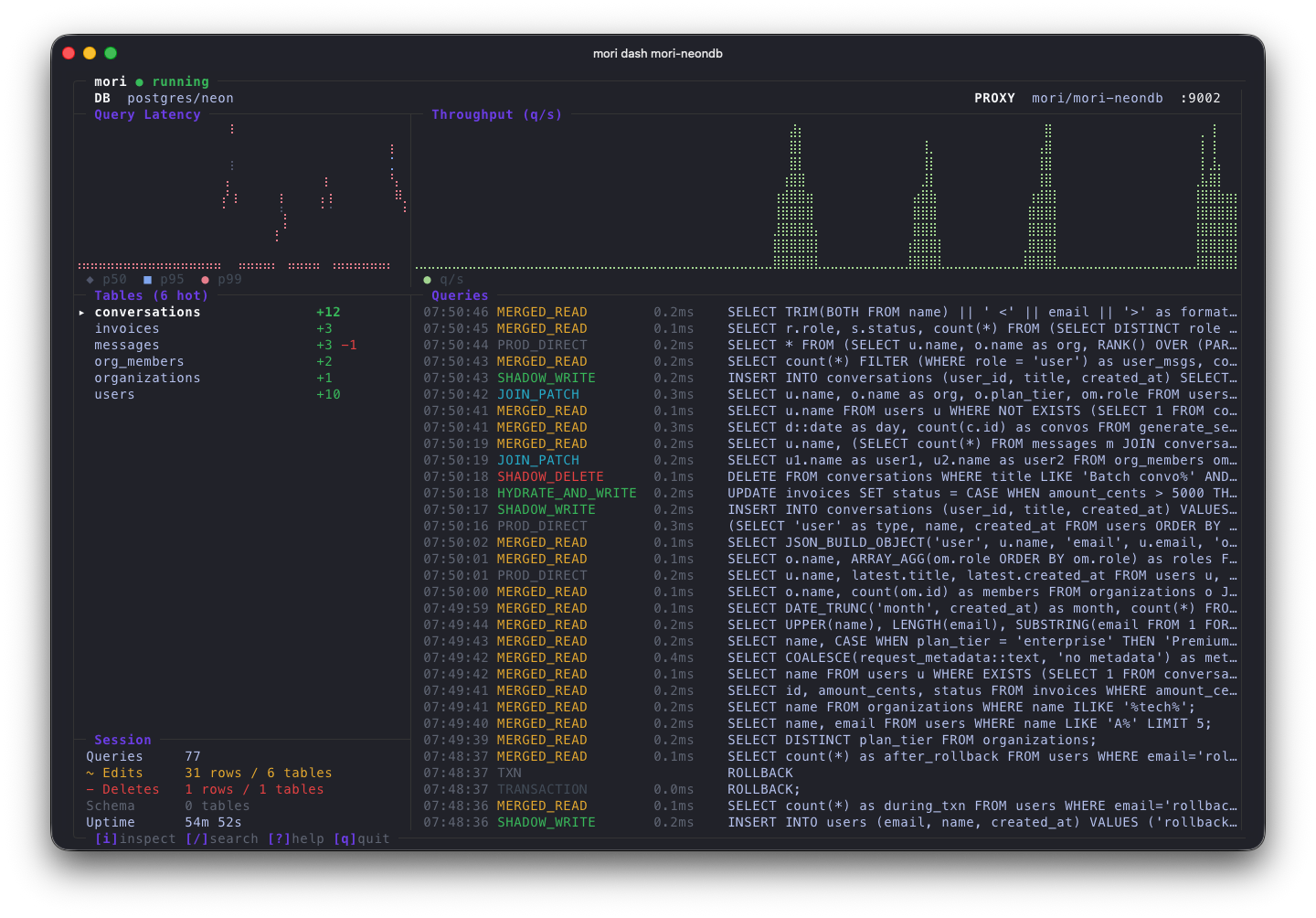
Dashboard Layout
The TUI is organized into panels:- Top Bar — Connection info, engine type, proxy port, session duration
- Latency Chart — Real-time query latency visualization
- Throughput Chart — Queries per second over time
- Tables Panel — List of affected tables with delta counts, tombstone counts, and schema divergence indicators
- Query Stream — Live feed of queries with classification, routing strategy, and timing
- Session Summary — Aggregate stats (total queries, reads, writes, deltas, tombstones)
- Bottom Bar — Keybinding hints and help
Keybindings
Features
- Real-time query stream — Every query that passes through the proxy appears in the stream with its classification (READ/WRITE/DDL), routing strategy (Prod Direct, Merged Read, Shadow Write, etc.), and execution time.
- Table inspection — Select a table to see its delta count, tombstone count, schema divergence (added/dropped/renamed columns), and PK type.
- Search filtering — Filter the query stream by table name, operation type, or SQL text.
- Live charts — Latency and throughput charts update in real-time as queries flow through the proxy.
The TUI reads state from the same
.mori/ directory as the proxy. It can be launched while the proxy is running to monitor activity, or after the proxy stops to inspect final state.